Showing posts with label Canon. Show all posts

5/1/13

Canon 5DMK3 clean HDMI output - first impressions (+ download uncompressed files)

Hi all,

Yesterday Canon released their so sought-after update for the Canon 5DMK3.
To be honest, for me, the cross type AF is not as interesting as the clean HDMI output.

So I've recorded initial test footage for some testing:

Youtube:


Download uncompressed:
http://www.solidfiles.com/d/579e4310bc/

Youtube:


Download uncompressed:
http://www.solidfiles.com/d/5a88f92606/

(The files are huge so the ones I've uploaded are very short)

Equipment:
Camera: Canon 5D Mark 3
Profile: Neutral - 0,-4,-2,0
Lens: 24-105L F4 @ F8
Shutter speed: 1/160
Recording device: BlackMagic Shuttle

Brief review:
Canon declares that the output is 8bpc@4:2:2, which is a little bit disappointing especially when the HDMI standard supports 10bpc and I almost sure that in Canon cameras the video processing pipe works at least in 12bpc.
I decided to go beyond Canon's declares and check if I can force it to push 10bpc, in the following way:
- BlackMagic Shuttle will always record at 10bpc; if the input is 8bpc, the Shuttle bit shifts the values (multiplies by 4: 0->0, 1->4 ... 255->1020).
- I've extracted a single YUV frame and warped it in 16bpc (w/o bit shift).
- In hex editor you get, for example, this (in this case it is the U channel):
And you can see that each value (little endian) divides by 4 without fraction.
A801 = 424 -> 424/4 = 106
9C01 = 412 -> 412/4 = 103
etc...

So yes, the conclusion is that the output of the HDMI in the 5D is 8bpc only.
Think how would it be if it was 10bps... In short, the following operation theoretically would give an image without the ugly banding:

The question that should be asked now is: Does it really give 4:2:2 chroma sub-sampling?
Well, I don't know in this moment. Canon may perform scale-up algorithm other than nearest-neighbor (x2 width) and you will never find cloned pixels (although you can see a lot of typical duplicates in the hex viewer, but it is not an indicator), especially in the so soft Canon's 3x3 sensor binning with flat picture style.
For for this moment, lets believe it is pure 4:2:2, and maybe in the future posts I'll do some more in-depth test that will approve or refute the claim :)

That's all for today,
Mark.


9/27/12

Which sharpness value to set in your Canon HDSLR?


Hi all,

VisionColor suggests to set the sharpness parameter to “+1” while almost everyone else argue that “0” is the correct one for video.

The reasons for “0” are to reduce the moire and the assumption that the sharpening won’t add any detail anyway but halos. Well, the guys from VisionColor know what they say.

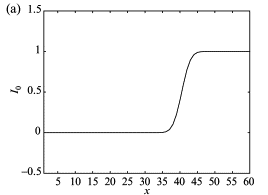
Technically, edge enhancement (sharpness) is a convolution of an edge
:


(a clean signal is brought as example)

With this function:


Resulting the function to look:


That’s the reason for halos around the edges, the bright side of the contour is brighter and the dark - darker. No extra detail from nowhere will be added.
By definition, edge is a contrast line bigger than a defined threshold.
H.264 has an algorithm for smoothing very fine details since they are very wasteful to the encoder, even if the bitrate is high. It gives overall better results in most of the cases because it prevents high quantization of the more dominant edges. When we sharpen the footage within the camera we create better edge separation and actually tell the encoder that the edge that was too fine and was squeezed, now is above this squeezing threshold - and will be encoded with the rest of the frame. Bottom line, a value of “+1” in the sharpness in your Canon DSLR may keep some of the fine details from being quantized in the encoder without too ugly halos.
Canon’s encoder has a limit in minimum QP of 10 and relatively a high bitrate (though very primitive encoder), so in 90% of your footage you won’t have any difference on the entire quantization of the frame.
“+2” and above will create externalized halos, probably won't preserve much more detail and of course a lot more (loved by all) moire - so it is less recommended.

The following examples were taken while the camera is in motion (rotation actually - this way it is more difficult for the encoder to estimate the motion):
(View full image) (View full image) (View full image)

As it can be inferred, "1" is the sweet spot in terms of detail<->halo. However, the downside is obviously some slight moire addition (for example: the diagonal line in in bottom right corner). We should treat moire as "no going back". Moire is an anomaly occurs because a digital prediction, in places of optical gap, causes never existing edges. AFAIK, it cannot be fixed effectively in post - even if you blur the footage.

Conclusion (for ISO 640 and below):
If your project will go any further than Youtube, Vimeo or any highly compressed video viewer - set sharpness to "+1".
Otherwise: consider "0".


How sharpness affects high ISO footage?
Paradoxically, at high ISO you’ll get less noise when the sharpness setting is higher. It would happen because you sharpen the noise and it gets quantized - this way damages the image. Smart temporal denoise to get extra detail will be discussed in future posts.

The following examples are identical to the previous, except for the ISO that is set to 1250 (In proper workflow I don't see any reason to go any higher than that):
(View full image) (View full image)             (View full image)            (View full image)   

The "+5" exists just to show how far you can go with it. Higher quantizer value = heavier compressed = more details lost.


Conclusion (for ISO above 640):
Like the low ISO conclusion with some more weight to "0".


In addition to all the above, I wouldn't suggest to sharpen the footage in post (especially if you also decide to do it in the camera) because it creates a MiniDV camcorder look. Feature movies usually are not sharpened (if not remastered for DVD).


Mark.


 Reference: http://www.sciencedirect.com/science/article/pii/S1076567004360015