Showing posts with label image processing. Show all posts

10/5/12

Why should we so appreciate All-I video in cameras?

WE SHOULDN'T.

(This article will discuss top level topic because digging to details will be pointless.)

Many manufacturers come with new encoder feature for their camera line. They call it All-I, iFrame & etc.
To explain it, I’ll start with the available encoder frame types:

I (Intra) = Intra frame that draws the image from scratch and compress it. Equivalent to JPEG image.
P (Predictive) = Inter frame that subtracts itself from previous “I” frame and the compression is applied on the residual. “Forward prediction”
B (Bi-directional) = Inter frame that can subtract itself both from previous “I” or “P” frames (forward prediction) and from the following “I” or “P” frames (backward prediction). The compression is applied on the residual.
("B" and "P" frames can also change their behavior in macro-block level to "skip" and "intra", if the encoder decides that it will save more bits)

There are 3 main arrangements for GOPs (group of pictures - the distance between 2 “I” frames): I-only, IP, IBP.


I-Only (All-I)
In this case every frame is unique and encoded separately without any temporal prediction. Actually it is like Motion JPEG (MJPEG). The most primitive encoder.


IP

Between 2 "I" frames will be a variable number of "P" frames. In cameras the distance between the "I"s is usually 15 frames (for 30 fps footage). Smart software encoders usually rely on scene changes to push "I" frames.

IBP

Between "I" and "P" frames or 2 "P" frames will appear a constant number of "B" frames. Cameras usually use 2 "B" frames. Software encoders will usually push from 1 to 5 "B" frames. The increase in "B" frames increases the complexity of both the encoder and the decoder exponentially.


After understanding the above, I won't be explaining why IP and IBP has extreme superiority over I-only - I will show you an example.

The video below was captured absolutely uncompressed. I've compressed it using X264 with "Camera like settings" (with most of the limitations that hardware has). Video's motion: continuous horizontal pan. The frame I've decided to grab is frame no.94 because it is a "B" type frame in IbbP GOP, i.e. the most compressed + the bit rate control got steady.

(CLICK TO ENLARGE)


Original images (Click to download):
Full Side-by-Side videos (Click to download):


So why are the manufacturers so proud of 20 years regression in compression technology?
  1. Good for editing purposes - well this is true. I-only is very light for today's workstations and enables you a real time playback of multi layered 1080p60 content. This is exactly why DNxHD and ProRes exist! Does it worth 4 times bigger files for the same quality? Personally, my workflow is to encode all the files to DNxHD 36mbps (terrible quality), edit them and then, when exporting, link all the timeline to the native files.
  2. They claim that IP and IBP may cause temporal artifacts (such as ghosting and trails). It is because they have crappy H.264 encoders (H.264 isn't a constant encoder - it very depends on how it is calibrated and which tools are in use) and instead of improving their H.264 encoder - they choose the cheap and easy way.
For more experienced users I would suggest to encode master videos using X264 in IP, ~90Mbps with less deblocking, High profile with 4:2:2 (Instead of DNxHD/ProRes). The result is almost lossless! 


In summary,
Don't be afraid of H.264 IP/IBP and don't surrender to I-only. We should demand improvement in cameras' encoder. 

Mark.

9/27/12

Which sharpness value to set in your Canon HDSLR?


Hi all,

VisionColor suggests to set the sharpness parameter to “+1” while almost everyone else argue that “0” is the correct one for video.

The reasons for “0” are to reduce the moire and the assumption that the sharpening won’t add any detail anyway but halos. Well, the guys from VisionColor know what they say.

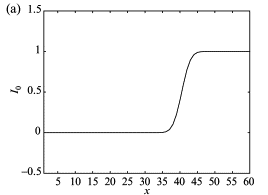
Technically, edge enhancement (sharpness) is a convolution of an edge
:


(a clean signal is brought as example)

With this function:


Resulting the function to look:


That’s the reason for halos around the edges, the bright side of the contour is brighter and the dark - darker. No extra detail from nowhere will be added.
By definition, edge is a contrast line bigger than a defined threshold.
H.264 has an algorithm for smoothing very fine details since they are very wasteful to the encoder, even if the bitrate is high. It gives overall better results in most of the cases because it prevents high quantization of the more dominant edges. When we sharpen the footage within the camera we create better edge separation and actually tell the encoder that the edge that was too fine and was squeezed, now is above this squeezing threshold - and will be encoded with the rest of the frame. Bottom line, a value of “+1” in the sharpness in your Canon DSLR may keep some of the fine details from being quantized in the encoder without too ugly halos.
Canon’s encoder has a limit in minimum QP of 10 and relatively a high bitrate (though very primitive encoder), so in 90% of your footage you won’t have any difference on the entire quantization of the frame.
“+2” and above will create externalized halos, probably won't preserve much more detail and of course a lot more (loved by all) moire - so it is less recommended.

The following examples were taken while the camera is in motion (rotation actually - this way it is more difficult for the encoder to estimate the motion):
(View full image) (View full image) (View full image)

As it can be inferred, "1" is the sweet spot in terms of detail<->halo. However, the downside is obviously some slight moire addition (for example: the diagonal line in in bottom right corner). We should treat moire as "no going back". Moire is an anomaly occurs because a digital prediction, in places of optical gap, causes never existing edges. AFAIK, it cannot be fixed effectively in post - even if you blur the footage.

Conclusion (for ISO 640 and below):
If your project will go any further than Youtube, Vimeo or any highly compressed video viewer - set sharpness to "+1".
Otherwise: consider "0".


How sharpness affects high ISO footage?
Paradoxically, at high ISO you’ll get less noise when the sharpness setting is higher. It would happen because you sharpen the noise and it gets quantized - this way damages the image. Smart temporal denoise to get extra detail will be discussed in future posts.

The following examples are identical to the previous, except for the ISO that is set to 1250 (In proper workflow I don't see any reason to go any higher than that):
(View full image) (View full image)             (View full image)            (View full image)   

The "+5" exists just to show how far you can go with it. Higher quantizer value = heavier compressed = more details lost.


Conclusion (for ISO above 640):
Like the low ISO conclusion with some more weight to "0".


In addition to all the above, I wouldn't suggest to sharpen the footage in post (especially if you also decide to do it in the camera) because it creates a MiniDV camcorder look. Feature movies usually are not sharpened (if not remastered for DVD).


Mark.


 Reference: http://www.sciencedirect.com/science/article/pii/S1076567004360015